
The Employees’ Provident Fund Organization (EPFO) has issued around 41.7 million Universal Account Numbers (UANs). Also, the EPFO is expected to launch its scheme on making Provident Fund numbers portable on 23rd,September 2014.
So, it is advisable to know – What is UAN? How to activate UAN registration? What is the procedure to update KYC on UAN? What are the facilities available on UAN member portal?
What is Universal Account Number?
UAN is a unique identification number issued by EPFO to its members. A universal number is generated for each of the PF (Provident Fund) Account Number at EPFO. This UAN will act as an umbrella for the multiple ‘Member Ids’ allotted to the same individual (Employee or EPF Account holder).
What are Member-IDs ?
Let’s say you have been working for Infosys for the last 2 years. You might be contributing to EPF through your EPF A/C. EPFO treats Infosys as an ‘Establishment’ and ‘You’ as a ‘Member’ of EPFO. Since you are a member of EPFO, Infosys would have created a ‘Member-Id’ through which you contribute to your EPF a/c. So, Member-ID is nothing but your EPF a/c number.
EPFO will generate ‘UAN’ and shares it with Infosys. You have to collect UAN from your employer. Your existing member-id will be linked with your UAN.
Next year, if you shift to a different company then UAN remains the same. But, your new company will provide another ‘Member Id.’ This is linked to your UAN. You just need to disclose your UAN/previous member-id to the new employer through Form-11. Like this, UAN will act as an umbrella for the multiple ‘Member Ids’ allotted to the same individual.
How to check the status of my UAN (Universal Account Number)?
- Visit this LINK.
- Click on ‘Know your UAN status.’

- Enter your EPF a/c details and check the UAN status.

How to activate my UAN?
Once you collect UAN and Member-Id from your employer, you need to activate your UAN.
- Visit this LINK.
- Click on ‘Activate your UAN.’
- Enter your UAN, Mobile no and Member-ID details.
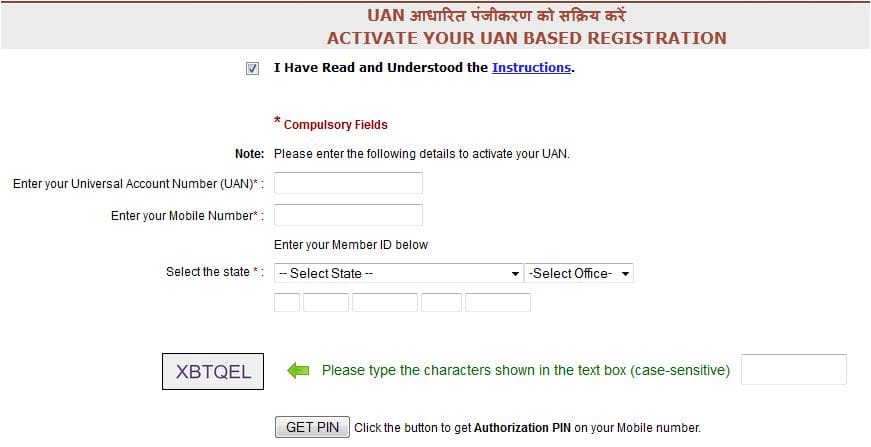
- Click on ‘Get Pin’ to receive authorization pin number on your mobile
- Click on ‘I Agree’ and enter authorization pin number
- In the next screen enter Father’s / Husband’s name and Date of Birth.
- Create a new password. (User name is UAN only)
- Provide Email-Id and click on submit.
You may now login to the UAN member portal anytime using the username and password.
Facilities that are available on UAN member portal

- You can download PF pass-book. This contains employer’s and your EPF contribution details.
- You can download UAN card in PDF.
- You can update your previous Member-Id. The name in the previous ID should match with the name of the current member-id.
- View the details of all the linked Member-IDs.
- You can submit new ‘EPF Transfer claim.’ (As of now this is not live)
- You can view the Transfer Claim Status.
- You can change mobile number, email-Id and personal details
How to check KYC status?
- Login to UAN portal with your username and password
- Click on ‘Download’ option to view your UAN card
- If your employer has uploaded KYC (Know Your Customer) docs then it will reflect on the front side of your UAN card as ‘YES’. In case of non availability of KYC, then it will reflect as ‘NO’

- You can upload KYC docs by yourself by clicking on ‘Profile’ option.
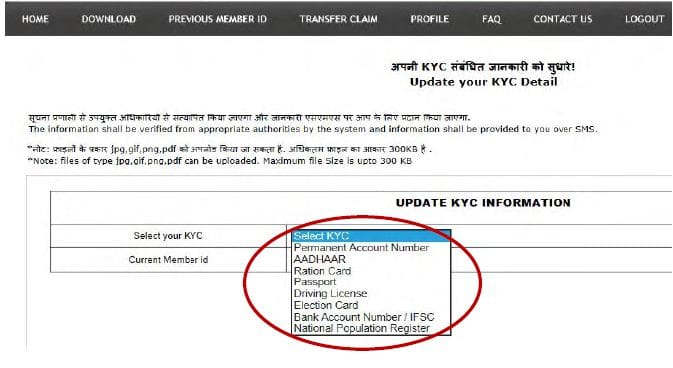
- Upload any of the required KYC docs and submit.
- Your employer has to approve your KYC submission
If you are employed for the first time then your Employer will collect the completed Form-11 and KYC documents from you. These documents are submitted to EPFO by the employer. Your employer will confirm these details with EPFO. Once it is approved by the employer, this information will be pushed to EPFO for UAN allotment/linkage accordingly.
The total members of EPFO are estimated to be 11.78 crore as on March 31, 2014. UAN member portal is user-friendly and will be beneficial to all the members.
(You may like visiting my post on “How to transfer EPF account Money online when you move to a new company?”)
So, next time when you change the job, you need to simply declare your UAN with your new employer. No more troubles with transferring the EPF a/c. Have you received your UAN? Have you activated your UAN registration? Share your experience.
Join our channels


i am not alotted uan by rpfc yet and i want to resign and join new company i do not want to disclose my past employment record what should i do
My mobile no change
Dear Nayan,
You may kindly go through this article @ How to update or change EPF UAN Account Mobile number online?
Hi Sreekanth
I have forgotten password
i do not have the mobile number active and hence i wont get OTP
i am trying the option of generating OTP by not receiving it on mobile number
but, it is not verifying my details even though i am providing correct UAN ; name ; DOB
Hi SreeKanth,
While Trying to activate my UAN I am not receiving OTP Could you please advise on this.
Thanks
Dear Manzi,
Could be due to a temporary technical issue..
If it persists, you may submit a grievance request to the EPFO via this link..
Related article : EPF Whatsapp Helpline Number for Grievance Redressal | Whatsapp Contact numbers of EPFO Regional Offices
Thanks for your valuable reply Sreekanth