
In the last few weeks, I have been receiving queries on login and password related issues of EPF UAN (Universal Account Number). Most of these queries are posted in my other article – “all you need to know about UAN”. I felt that publishing a separate article on EPF UAN login related issues can be useful.
Most of the queries are related to;
- Lost my mobile number so unable to receive OTP.
- How to update my new mobile number?
- I am not receiving OTP SMS on my mobile?
- Forgot UAN login password, how to get a new one?
- How to change my DOB (Date of Birth) details in UAN portal?
- How to make correction in Father’s name in UAN portal?
- DOJ (Date of Joining) is incorrect, how to get it rectified?
- Employer is not verifying my KYC details and so on..
Latest Update (22-Nov-2017) : The EPFO has recently launched a new online provision to correct/change your Personal Data (like Name, Date of Birth or Gender) against EPF UAN. Kindly visit my latest article on this topic. Please ignore the information provided in this article. UAN helpdesk is not longer functional.
What is UAN?
Let’s first understand what is EPF’s UAN?
The UAN (Universal Account Number) is a 12-digit unique number allotted to each Employee Provident Fund member by the Employee Provident Fund Organization (EPFO). This UAN will act as an umbrella for the multiple ‘Member Ids’ (PF Account Numbers) allotted to the same individual (Employee or EPF Account holder).
To log into UAN portal, mobile number and password are mandatory. So if you change your mobile number or forget password, you need to update your new mobile number / create a new password.
In UAN portal, under ‘Manage’ menu you have the option ‘Contact Details’ to update new mobile number but you can use this option only if the old mobile number is still active.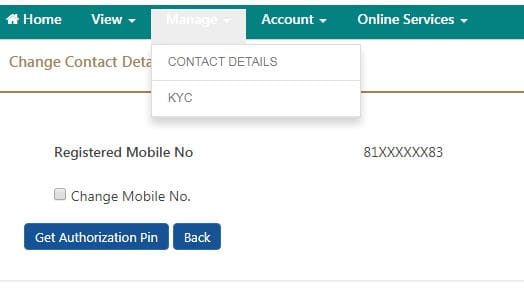
What if you lose your mobile number and also forget your UAN Login password? In this scenario, you can submit online request through EPF UAN Helpdesk.
EPF UAN Helpdesk
Kindly visit UAN online helpdesk portal. Click on ‘Member’option. (It has been noticed that UAN’s helpdesk portal is not accessible for quite sometime now, you may kindly contact your Employer/EPFO for any correction of details related to UAN.)
You can use UAN helpdesk to resolve the below issues. Kindly note that this online helpdesk facility is still a beta version.

- What is My UAN? : You can know your UAN number by submitting details like mobile, member Id (EPF a/c number), Father’s name, DOB etc., Kindly note that you can use this option only if you have an active and your mobile number is registered in UAN portal.
- Forgot Password & Mobile Number Changed : I believe that most of the UAN login issues are related to this option.

- You can use this option if you have forgotten both your UAN login password and also lost your mobile.
- If you have forgotten password but your registered mobile number is active, you can reset it by visiting UAN portal.
- If you remember your password but would like to just update new mobile number, in this case also you can login to UAN portal and update the new mobile number under ‘Profile’ menu option.
Latest Article : The online procedure to change or update your mobile number in UAN account has been changed, kindly go through my new article @ ‘How to change Mobile number in EPF UAN Account online?’.
- You can submit a request to correct details related to name (self), father’s name, Date of Birth, Date of Joining your company etc.,
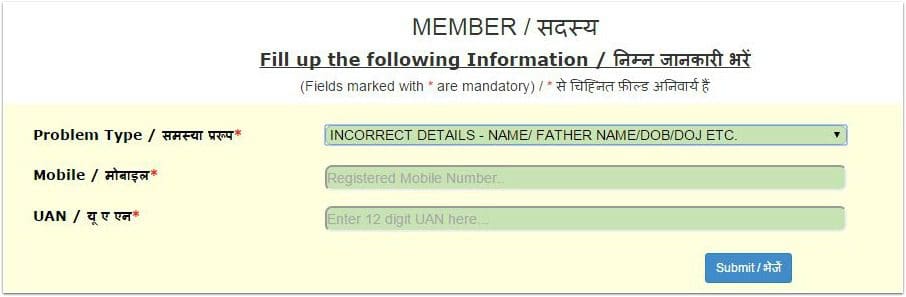
- Issues related to ‘SMS not received when activating UAN can also be resolved through this facility.
- You can submit online request to know the status of your PF transfer claim.
After submitting the request, you will receive an OTP to your mobile number. You have to key in this OTP and vefiy it. A reference number gets generated and this is also sent to your mobile number.
This online facility is still a beta version. So, you may experience some technical challenges while submitting your online requests.
In such a scenario, you can submit your offline request through your employer. What is the procedure for correction of details like name, father’s name, mobile number etc in EPFO database?
- Submit an offline request to your employer enclosing relevant supporting documents. For example : if your name has been entered wrongly in EPFO database and if you wish to get it corrected, you have to submit a copy of ID proof to your employer. (Download EPFO’s circular on ‘correction in name of PF member’. The circular also has the list of documents that are accepted as the supporting documents)
- Your employer will then forward your request to the concerned EPFO’s field officer.
- After verifying your request & supporting documents, the EPFO will get your details (member details) corrected in their database.
For queries related to UAN services, you may contact :
- EPF UAN Helpdesk Number : 18001-18005
- Helpdesk Email Id : uanepf@epfindia.gov.in
(Read : ‘Have you been allotted two UANs? How to deactivate old UAN?‘)
(Reference : www.epfindia.com)
Join our channels


Getting invalid OTP though entering the valid OTP while resetting the password in EPFO login. Please advise.
Recently I updated my name in Adhaar card. I forgot my uan password and when I went through forget password it is asking activate UAN, but when I am activating UAN it is getting name doesn’t not match with unified portal.
How can I activate my UAN.
Uan number is invalid showing
My PF account name is incorrect and I need to change in my correct name and I unable to login in UAN portal also.
When I try to login the error is come – miss match with verification.
Could you please advise to how to change my name.
Hello Sir,
After i changed password in uan login portal again its asked to change a password i am not able to login in uan portal.repeatedly i am trying to login same window is displayed to change a password.past 10 days i facing a problem.pls help me sort out.
Hello sir,
I have an issue with my login to UAN , i forgot my password to login , so I gave forgot password , when I give forgot password it is showing that UAN is deactivated. So, I tried to activate my UAN , but it is showing UAN is already activated.can u tell me what is the issue
I am unable to login to my EPFO account as I get the following error “Date of Birth information is not available in the system”. Besides the mobile number I had registered was a corporate number issued by my organization.
Questions –
1. Is there a way to update my date of birth without logging into EPFO.
2. How do I change my mobile number, and should this only be a local India number or will it accept an international number as well
3. My No is currently showing mapped to my wife’s UAN, can we add two UAN’s to one mobile number.
Look forward for a response to assist me here fixing this issue
Dear Thomas,
1 – Suggest you to kindly go through this article ..
2 – Yes, local india number required. . UAN with a verified Aadhaar number and have mobile linked with Aadhaar number for receiving the OTP sent for verification is used for all services.
3 – As per the EPFO website FAQs, One mobile number can be used for registration with one UAN only.