
EPF Form 11 is a declaration form which has to be submitted by an employee when taking up new employment in an organization which offers EPF Scheme (Employees Provident Fund). This form contains basic information regarding the employee like – name, date of birth, contact details, previous employment details, KYC (Aadhar, Bank account, PAN etc) details.
As of now, when you are joining a new employer, and if you have contributed to EPF in your previous employment then you have to submit new Form No. 11 (Declaration form) and Form No. 13 (for PF transfer from old EPF account to you new EPF account) for offline EPF transfer. The EPFO has recently enabled an online EPF transfer facility as well.
The EPFO has now come up with one more initiative – when you change your job, you no longer need to transfer the funds from your old EPF account to new EPF account by submitting Form – 13 (or) through online facility which is available on Unified member portal.
Instead, at the time of joining new employment, the employees’ (EPF members) can now give details of their previous EPF account in new revised Form 11 with effective from 20th September, 2017. Once the old EPF account details are provided in new Composite Declaration F-11 form, the funds will be automatically transferred by the EPFO to new EPF account.

Members satisfying the following preconditions and whose UAN and Aadhaar number is entered and matched by the present employer against the existing details as available against the UAN would be marked for auto transfer:
- The Aadhaar number of the member must have been seeded and verified against the UAN at the previous establishment level.
- Member’s details like Date of Joining, Date of Exit and Reason of Exit should be available in respect of previous employment.
- UAN is activated and Mobile number is available
New EPF Composite Declaration Form (new Form 11)
It has been decided by the EPFO that the new composite declaration form (F-11) will now replace existing Form 11 & Form No 13 in all cases of EPF auto transfer.
Henceforth, the below new EPF declaration form – 11 should be used by the employers to collect the declaration details from their employees and also in case of EPF automatic transfer claims.
If your UAN was Aadhaar seeded and verified, the declaration by the employer in Form-11 for transfer request made by the employee will trigger an auto transfer process which will transfer the accumulations against his previous EPF Member-ID to the New PF Member-ID.

(Click on the above image to download Revised Form 11 / new Composite Declaration Form 11)
On joining a company, you need to provide the following details in new Form 11 form ;
- Your personal details like Name, Parents name(s), Date of Birth, Gender, your Marital status & Contact Details.
- You have to provide your KYC details like – Bank account number, its IFSC code, Aadhaar number & PAN.
- You need to provide date of joining of current establishment/company.
- If you have been employed earlier and contributing to EPF scheme, you have to provide your previous employment details like – Company name, your UAN, EPF account (Member-ID), Date of Joining, Date of Exit etc., As you are providing your existing UAN number, the chances of being allotted with multiple UANs can now come down.
- You need to sign the declaration form and submit it to your current employer.
Your employer will then provide their declaration (authorization) details and take appropriate action for automatic transfer of EPF account (if any). An auto-transfer would be initiated once first payment in respect of the new employee is received from the present employer against the UAN flagged for auto-transfer. An SMS and e-mail (if registered) will be sent to the member once the transfer is auto initiated.
How to stop Auto-initiated PF Transfer Claim?
The member can request to stop the auto initiated transfer either online using the “Stop Auto Initiated Claim Cases” functionality provided in the “Track Claim Status” link under “Online Services” tab in the Member Portal (or ) through present employer (or) by approaching the nearest EPFO office within an outer limit of 10 days of receipt of SMS informing the member of auto initiation of transfer request.

In case, the request to stop the auto initiated transfer against a given UAN is not received within the stipulated 10 days from either of the member, the auto EPF transfer claim will be processed.
In case, your previous EPF account has not been Aadhaar verified, your employer may initiate offline/physical transfer of your PF funds.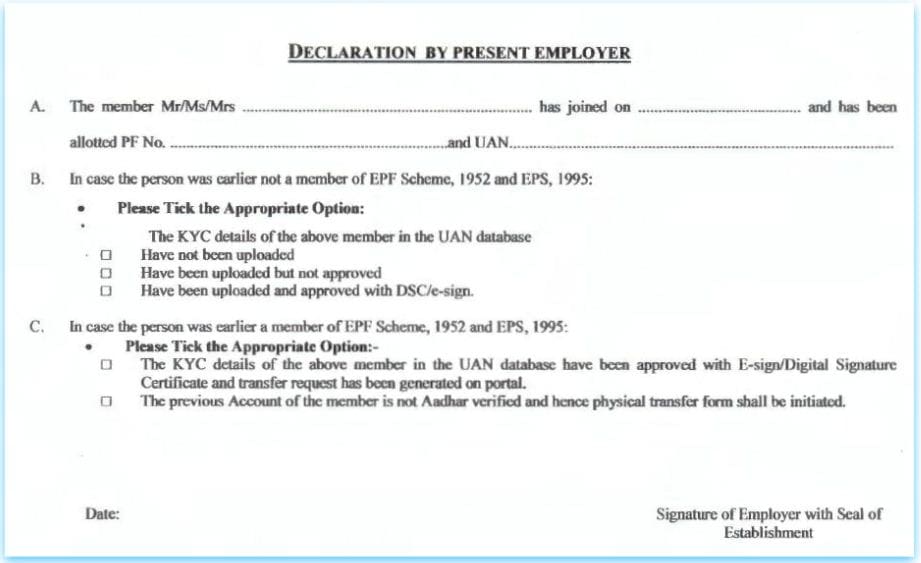
Kindly note that the Auto transfer of previous PF account would be possible in respect of Aadhar verified employees only.
In case,
(a) your earlier UAN was not seeded with Aadhaar (or)
(b) UAN was Aadhaar seeded but not verified (or)
(c) EPF transfer from or to an exempted establishment, then the member needs to apply for transfer in Form-13 as per the existing procedure for physical transfer (form 13), for transfer of account from the previous establishment.
It has been estimated that the EPFO receives around 1 crore different type of claims, including EPF withdrawal, pension fixation, death claims and EPF transfer claims. The transfer claims constitute 10-15 percent of the total claims filed by subscribers. Hence, this new initiative may prove to be beneficial to EPFO staff, employers and EPF subscribers as well.
Continue reading :
- How to withdraw EPF online?
- Interest on Dormant/In-operative EPF Accounts!
- EPF Partial Withdrawals (Loans/Advances) | Options & Guidelines
(Source & Reference : EPFO’s notification) (Post first published on : 23-September-2017)
Join our channels




Name. Mitu ransingh
P.f no.1002286526**
Pf.no Tn.17299/692**
E.s.i.no.51232411**
Phone.no.97898753**
D.o.b.01.4.19**
I have transferred my old EPF to my present EPF account so my query is where does my EPS Amount disappear . Now in my present EPF account only the EPF contribution amount is availble . Kindly can u tell where is my EPS Amount went can i get that amount or not.
Dear Manish,
You may kindly go through this article – What happens to EPS after change of Job?