
If you are a salaried person, I am sure you would have received your Form 16 by now. This document is issued by the employers every year. It is very important to understand the details given in Form 16. Understanding the content of Form-16 helps you file your I-T returns easily.
So, what is Form 16?
It is a certificate under section 203 of the Income-Tax Act, 1961, which gives information on the tax deducted at source (TDS) from income chargeable under the head “salaries”. It gives details of the tax deducted by your employer. In layman terms, Form 16 is the ‘Salary / Income Certificate’ that is issued by your employer.
In this post let us understand – What the various sections in Form 16? What is the difference between Form 16 & Form 16A? What is the link between Form 16 & Form 26 AS? How to verify if TDS is deposited or not? How to use Form 16 to file your Income Tax Returns? What you need to do if you have multiple Form16s?
Form 16 – Details & Sections
Form 16 is a user-friendly document. It has two sections, ‘PART A’ & ‘PART B’.
Part A of form 16 has details like –
- Employee’s name & address
- Employer’s name & address
- PAN no and TAN no (Tax deduction account number) of your employer (the Deductor)
- PAN details of employee
- Assessment Year (the year in which your tax liability is calculated for the income earned in the previous year. If financial Year or previous year is 2014-15, assessment year would be 2015-16)
- Part A provides the summary of TDS deductions. (This summary can be quarterly / monthly basis or on the periodicity of how your employer deducts TDS and credits the tax to the IT department)
- This section also gives you details about the ‘period of employment’. (If you have worked for two or more companies in a financial year, you will have multiple form 16s)
Part B of Form no 16 has below details;
- Income Chargeable under the head of ‘Salary’ . (Includes salary – Allowances and deductions (like LTA /HRA / Professional tax etc)

- Gross Income is Salary income + any other income reported by you. (Other income can be negative income ie loss from your house property or capital gains etc.,)
- Next, deductions Under Sections 80c / 80 ccc / 80 ccd are provided. (The maximum limit is Rs 1.5 Lakh)

- Then the deductions under other sections such as 80D (health insurance premium), 80E (interest on education loan), 80G (donations), and others are provided. (You would have submitted investment proofs for claiming tax deductions to your employer, these tax deductions are listed here)

- The totals of qualifying deductions (Aggregate of deductible amounts under Chapter VI A : Point no 10) are reduced from your Gross Income (Point no 8) to arrive at the ‘Taxable Income’ (point no 11). Tax is calculated (Point no 12) on this amount based on your tax slab.

- If TDS is deducted by your employer, this amount is subtracted from your total tax liability. The net tax amount can be nil (or) some tax amount payable (or) refund. (The balance, if negative, is your refund amount)
If your income from Salary is more than the basic exemption limit (Rs 2.5 Lakh for FY 2014-15), your employer is required to deduct TDS from your Salary and deposit it with the Government.
If you have also disclosed your income from other heads to your employer, they will consider your total income for TDS deduction. If your income is below the minimum exemption limit your employer will not deduct any TDS and may not issue you this form. If you have worked with more than one employer during the year, you will have more than one Form 16.
Form 16 Vs Form 16A
Form 16 is your Salary Certificate or TDS certificate issued by your employer. Form 16 A is also a TDS certificate which is generally issued on quarterly basis. While Form 16 is for only salary income, Form 16A is applicable for TDS on Income Other than Salary. (Form 16A is a statement containing all details of TDS Deducted on all Payments except Salary)
Form-16A also has details of name & address of deductor/deductee, PAN/TAN details, challan details of TDS deposited. It also has details of income that you have earned and the TDS deducted and deposited on such income.
Example – Form 16A is issued by banks when they deduct TDS on interest income earned on your Fixed Deposits / Recurring Deposits.
Let me provide you with a sample Form 16A. I have received the below Form 16 A from Standard Chartered Bank. On one of my FDs, I got a credit Rs 1,188 as interest income and on it Rs 118.80 has been deducted as TDS (@10%). (Remember, if you are in a different income tax slab rate say @ 20%, you need to include this interest income and pay the balance taxes accordingly)
What is Form 26AS?
(How to check or verify if TDS deductions are deposited with IT dept?)
As discussed above, TDS is deducted on Salary and other income, and deposited with Income Tax Department. So, how to check if these TDS amounts are actually deposited with the department or not?
Form-26AS gives you all the details of Tax credits. It is a form which indicates that the tax that has been deducted has also been deposited with the Govt.
Latest article : “All you need to know about New Form 26AS | Annual Information Statement”
The Form 26AS contains details of tax deducted on behalf of the taxpayer (you) by deductors (employer, bank etc.). So, TDS deductions that are given in Form 16 / Form 16 A can be cross checked using Form 26AS. The TDS amounts reflected in Form 26AS and Form 16/16A should always be the same.
(If there are discrepancies, the IT dept will consider the TDS figures as per Form 26AS only. You need to contact the TDS deductor to rectify any errors. For example– If your employer has updated your PAN wrongly, TDS deduction will not get reflected in your From 26AS. In this case, you need to get this error rectified by your employer.)
To access your Form 26 AS, you need to visit Income Tax website and click on View Form 26AS. You need to provide your login credentials to access this form. You can then download relevant financial year’s form-26AS statement. (Form 26AS is provided by TRACES – TDS Reconciliation Analysis and Correction Enabling System)
Below is a sample Form-26AS. In the below image you can view TDS on EPF withdrawal and TDS details from the employer (Tata Consultancy Services Ltd).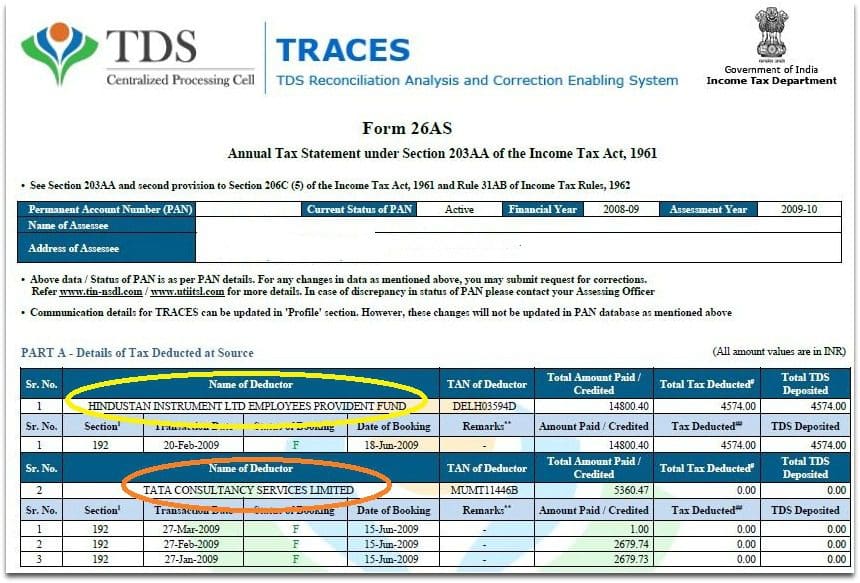
You can also find details of your tax payments (self assessment tax/ regular assessment tax/ advance tax) in Form 26 AS. Details of tax refund received during the financial year are also available in this form.
Form-16 & ITR (Income Tax Returns)
Form16, Form 16A (if you have income from other sources) and Form 26AS documents will come handy while filing your ITR. As discussed above, you have most of the details in your form 16 with which you can easily file your Tax Returns. Cross check your Form 16/16A TDS amounts with Form 26AS and then key in TDS details in ITR accordingly.
Based on Form 16, you can fill ‘Income’ and ‘TDS’ details. Based on Form 16 A, you can fill ‘income from other sources’ and ‘TDS’ details in ITR sheet.
Based on Form26 AS, you can cross check the above TDS payments and also fill in details of ‘Advance or self assessment tax’ payments (if any) in your ITR sheet.
Multiple Form 16s
If you have changed your jobs during the financial year, it is advisable to submit your income from previous employment to your new employer. In addition to this, submit all your investments, house rent etc., details to your current employer.
If you do so, the form 16 which is released by your new employer can have all the required details and TDS will be deducted accordingly. Do note that you need to enter the TDS deducted by your current as well as previous employer in your ITR, and pay taxes (if any) accordingly.
In case if you have not shared the details, you can file your Tax returns online based on multiple Form 16s. You need to consider both the incomes together and pay taxes accordingly. (Remember, do not consider tax exemptions twice while calculating the tax liability)
(It is advisable to save a copy of all your form-16s. As soon as you receive form-16 from your employer, email and save it in your personal mailbox. These forms are useful not only for filing Tax Returns but also for applying for home loans / term insurance etc.,)
Continue reading :
- All you need to know about New Form 26AS | Annual Information Statement
- TDS deducted by Employer but not Deposited? How to check TDS details online?
- Do I need to file my Income Tax Return?
- 5 Practical ways to increase your Take Home Salary (Pay)!
- Income Tax Deductions List FY 2023-24 | Under Old & New Tax Regimes
I hope you find this article informative. Kindly share your comments. Cheers!
(Image courtesy of Stuart Miles at FreeDigitalPhotos.net)
Join our channels





Very useful information
Hello, Srikant Ji
I was paid extra salary from my previous employer in Feb 2020 and Mar 2020, erroneously,which was already recovered by my current employer. Can my current employer reduce this years gross salary he reducing the recovered salary in Form 16 ? If yes , then can you please refer the IT rule under which it is possible ? I have already filed ITR for 13 month’s salary although the amount is alreadt recovered. can you please help me ?
Dear Sahoo,
They can correct the Form 16 entry and the same can be reflected in Form 26AS.
You may request the deductor (employer) to rectify the TDS/TCS statement using prescribed correction statement.
Based on this, you can file revised ITR, provided it is still under process.
Advisable to take help of a CA.
Thanks a lot for your quick response. i ll ask my employer to correct it. I may ask further here for any further clarification, if required.
In a short time, understood very clearly what are these forms and how they are different to each other. Thank You Sreekanth for such clear explanation with screenshots.
Where a depositor has multiple deposits with a Bank, Form 16A does not give break up of deposits along with the period for which interest paid/credited by the deductor. It is therefore not possible to check the correctness of deduction by the Bank or deductor.
Dear VAIDYANATHAN ..Yes, agree with you. Thank you for sharing this info!
Form 26AS as well as form 16A (as down loaded rom traces) are both showing tds deduction, but cpc financial accounting system is not showing the same and hence credit not allowed by cpc. How to resolve the issue
Dear Manju,
Form 26AS report itself is from the IT dept’s data..
You may submit your grievance to them via e-Nivaran portal..
There is mismatching of income from interest as shown in 26AS and form 16A as issued by the Bank. Interest income is higher in 26AS. While filing ITR online, the figure of Form 16A is autopopulated. should I change the figure manually while filing ITR. What should I do?
Hi,
Kindly first check with your banker about the discrepancy in Interest income??
WELL ADVISED BY YOUR SELF TO FILLING ITR. NOW MY QUESTION IS THAT I AM GOING TO RETIRE ON 31ST AUGUST 2018.GETTING CPF APP.RS.3500000/-PLUS RS.1500000/- TOTAL RS FIFTY LAKH. NO REGULAR PENSION IN MY DEPARTMENT ,WHERE TO INVEST THIS AMOUNT TO GET REGULAR INCOME PER MONTH .I THINK YOUR CONSULTATION/ GUIDANCE BE REWARDING ME BEFORE INVESTING.
Dear VIPAN ji,
You may kindly go through below articles ;
* Retirement Planning in 3 Easy steps
* Lump sum Investment options for Retirees/Senior Citizens | Where to invest my Retiral benefits to get Regular Income?
Dear Sreekanth,
In my case Total amount paid/credited in Form 26AS match with gross/total salary of Form 16 (point 1) which is more then my income chargeable on head salaries in Form 16(point 6 which after HRA exempted).
Which one shall I consider as my taxable income, Total amount paid/credited in Form 26AS OR income chargeable on head salaries of Form 16
If I consider income chargeable on head salaries of Form 16, then it would mismatch from Form 26AS.
Please suggest me.
Part A amount paid/credited is higher than part B. Shall I change the amount as per part B in sch 1 column while filing. Shall I edit the column or not please tell me.
Part A amount paid/credited is higher than part B. Shall I change the amount as per part B in sch 1 column while filing. Shall I edit the column or not please tell me.
Hi,
I just observed that in Form 16 received from my employer, Total Amount Paid/credited shown in Part A of Form No. 16 is less than PART B (Annexure) Gross Salary. What could be the reasons for this difference? and Which income sholud I consider while filing IT returns? TDS is deducted based on Income shown in PART B (Annexure).
Dear Anusha,
Gross Salary includes allowances. Where as ‘income from salary’ is after deducting allowances..
Hi Sreekanth,
I was working with Company1 till March10, then shifted to Company2 but absconded it on 2nd day. I didn’t take/receive any salary from Company2. But the Company2 has generated Form16 for 1 month salary(tax = 0), which is updated in my Form26AS.
Now while doing my ITR, should I consider the 26AS and upload both Form16s? or Should I ignore the Company2 Form16 as I didn’t take their money?
Please suggest me what to do, if I don’t include Company2 Form16 will I be penalized by IT dept?
Many thanks in advance,
Raju.
Dear Raju,
Did Company2 credit you with 1 month salary?