
As you may be aware, the EPFO has launched an online EPF claim facility during the month of May (2017). This is a great initiative by the EPFO. This online PF withdrawal facility is beneficial for both PF subscribers and employees of EPFO.
Besides the online EPF withdrawal facility, an EPF subscriber (employee) can also submit his/her offline PF claims through new Composite Claim Forms.
However, it has been observed that the online EPF withdrawal facility has often been shut down for maintenance activities, due to which the employees are unable to withdraw PF online.
One of my blog reader’s has suggested an another alternative for making online EPF withdrawals i.e, through Govt’s UMANG App. 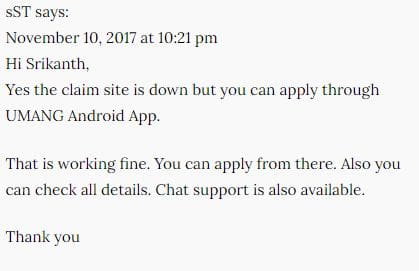
What is UMANG mobile App?
UMANG (Unified Mobile Application for New-age Governance) is envisaged to make e-governance ‘mobile first’. It is developed by Ministry of Electronics and Information Technology (MeitY) and National e-Governance Division (NeGD).
UMANG is one single mobile APP for availing various government (central/state) services online. It is expected that the app will soon integrate almost 200 government services by 2019. You can download this single mobile app instead of multiple apps for each department and can easily avail many Govt services at your finger tips.
As of now, you can find very popular services related to EPFO, PAN, NPS, Aadhaar, Passport, AICTE, CBSE, Pathshala, GST, HP Gas, Bharat Gas, Indane Gas, PMAY, DigiLocker, National Scholarships etc., on UMANG.
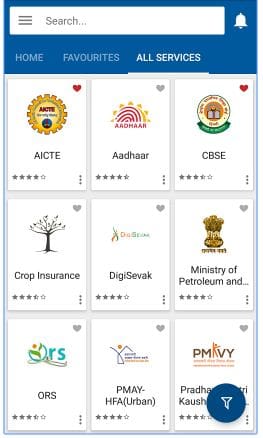
How to submit online EPF withdrawal claim through UMANG App?

UMANG app has an exclusive tab for EPFO related services. It offers both employer and employee-centric services. Under employee services option, you can avail below services;
- View or download EPF passbook.
- Claim EPS (pension) Withdrawal – Form 10c.
- Claim EPF (full) withdrawal – Form 19.
- Submit EPF (partial/advance) claim – Form 31.
- Track EPF claim status
Below are the pre-requisites to make online EPF claims through UMANG app;
- You have to link Aadhaar to Umang app.
- Need to have an active UAN number.
- You should have linked your UAN to Aadhaar number. (Related article : ‘How to link EPF UAN to Aadhaar?‘)
- Your KYC details (bank account number, IFSC code, PAN etc.,) under UAN interface should have been verified and approved.
Let’s now discuss the EPF withdrawal process through UMANG mobile app in detail.
- You have to download UMANG app from Google playstore.
- Kindly register your mobile number (as login-id) and set your MPIN.
- You will be prompted to link your Aadhaar number to UMANG, you can link right away (or) you may also find linking option under ‘My Profile’ tab. But, do note that linking Aadhaar to UMANG app is mandatory to claim EPF through this app.
- You can find/search for EPFO services.

- Once you click on EPFO tab, you can find three types of services namely – Employee Centric, General services & Employer centric services.

- In the next screen, you can find options – View passbook, Raise claim & Track Claim.

- To submit your EPF claim (Form 10c, Form 19 or Form 31), click on ‘Raise Claim‘ link. You will be prompted to key-in your EPF UAN in the next screen.

- Kindly note that an OTP will be sent to your mobile number registered with UAN/EPF account.

- After providing the OTP, you can choose the type of your online EPF withdrawal claim(s) and submit it through UMANG. (Kindly note that your employer is not involved in this process.)
- After the successful submission of your EPF withdrawal application, you would get the Claim Reference number. Kindly note it, you can track your EPF withdrawal claim using this reference number on UMANG app itself.
- In case, you have not transferred funds from your old EPF accounts to current EPF account, you will not be able to submit an online claim through Umang app. You may receive the below error message. (Related article : ‘How to consolidate old multiple EPF accounts?‘)

The UMANG APP can also be downloaded by giving a missed call 9718397183 or from UMANG website. Erstwhile EPF mobile services will soon be discontinued.
A word of advice – Your EPF contributions / savings are meant for your retirement (long-term). So, think twice before you withdraw your PF money. Try out all the options and sources to fund your expenses or needs. EPF Partial Withdrawals should be your last resort.
Latest update (03-May-2018) : EPFO Introduces ‘View Pension Passbook’ Service for the pensioners through Umang App. On clicking ‘View Passbook’ option in Umang app , it requires PPO Number (Pension Payment Order) and Date of Birth information to be entered by the pensioner. After successful validation of the information fed, an OTP will be sent to the registered mobile number of the pensioner. On entering OTP, ‘Pensioner Passbook’ will display the details of the pensioner like Name, DOB along with last pension credited information. The facility to download the financial year wise complete pass book details is also available.
Continue reading other related articles :
- How to track EPF claim status online?
- Online EPF withdrawal procedure, through EPFO unified member portal
- How to transfer EPF online?
- EPF partial withdrawal options & rules
(Post published on : 13-November-2017)
Join our channels




Sir/madam
My old pf account number is kn/25559/196 EPFPHO rajaram Mohan Roy road office before 2013 how can I get my PF amount with UAN number
Dear Sreekanth,
I have applied for PF partial withdrawal by filling Form 31 and selecting illness as there was no maternity option and it claim got raised successfully. I have also taken screenshot of Claim Number. Further I tracked the same claim number on Umang app, it is displaying the details, however when I checking the same on EPFO website, it is showing No claim registered. Please help. I applied to day on 11/12/2020 @ 8 pm, so how much time it takes to get registered on EPFO website to display claim details and also help how many days will it take for reimbursement? Thanks.
I want to withdraw my pf amount but unfortunately my ph no and aadhaar no is not linked, due to which I am not able to retrieve the otp.
Please suggest me alternative way to withdraw the money as the linking is not done by bank nor the post office and the aadhaar office is closed due to covid19.
Dear Rachana,
You can link your mobile number to EPF UAN online and then can link it to your Aadhaar.
You may go through below articles :
* How to update or change EPF UAN Account Mobile number online?
* How to link your Aadhaar number to EPF UAN online?
Hi Sreekanth,
I am trying to download pf using Umang app. It throws up error most of the time and if somehow i reach the final step to update final Aadhar otp/vid… After inputting the otp throws up the error “invalid otp” for no apparent reason.
Is this something anyone has come across?? Kindly advice.
Vivek
I mean raise a claim by download pf
Dear Vivek,
This can be a temporary tech issue, you may try submitting claim via UAN member portal??
I am also getting no response when clicking the raise claim option. It seems that the govt has blocked this option on Umang now onwards.
raise claim isnot working showing pop up currently department is not available,try after some time.this is going on since 10days
While submitting online claim for PF and PS from umang app, there was no option to submit Form 15G as my previous claim that i filed via epfo site got rejected for the same. Will it be rejected again?
Dear Aditya,
As of now, there is no option to submit Form 15G to the EPFO.
If its possible, you can visit the concerned EPF regional office and submit the form-15g (kindly quote your claim ref num & UAN).
Sir, I working a it sector last 8 month when I processed pf passbook no by drop-down then not showing proceed option
Dear Surajit,
Are you currently employed and contributing to EPF scheme?
Do you mean to say that you are unable to view Form 19 and Form 10c for EPF & EPS full withdrawals??
Hello Sir,
Thank you for the detailed information. My doubt is how to claim PF and PS at the same time from UMANG app. Kindly help
Dear Alice,
You can submit form 19 (EPF) and form 10c (EPS) separately ..
HI Sir Without date of exit i cannot withdraw my pf amout
Dear surya ..You may kindly contact your ex-employer to get DoE updated..
Hi, I worked for 2 companies, I already withdraw form19 from both pf accounts, I have transfered the 1st pf account to the 2nd one, now I want to know, when I apply for form 10c, will I get both pension contribution amount from latest pf account?
Dear Shravanthi,
Ideally, you should get the total accumulated EPS amount, provided your service period is less than 10 years..
Can I withdraw using umang app for form 10c?
Dear Shravanthi ..Yes, you can..